
Building NehorAI: How to Build an AI Bot That Actually Feels Human
What Is NehorAI
NehorAI is a Hebrew language AI assistant that helps users find vacation deals, concert tickets, Torah classes, sports scores, and breaking news: all through a natural chat interface. It runs as a Telegram bot, a web chatbot embedded on nehorai.ai, and as a referral based vacation deal finder.
The core idea: instead of browsing five different websites to plan a weekend getaway, you just tell NehorAI "I want to fly somewhere warm in August" and it comes back with flight prices, hotel options, and booking links, all in the same conversational tone as your friend from the neighborhood.
The Three Problems I Had to Solve
When I started building NehorAI, I thought the hard part would be connecting to an LLM API. It wasn't. The real challenges were:
1. How do you get fresh data?
An AI bot that gives you yesterday's flight prices is useless. But calling live pricing APIs during a chat conversation means 3 to 5 second response times: nobody waits that long in a chat.
2. How do you make it actually talk like a real person?
Hebrew slang is not something you can solve with a single system prompt. The bot has a specific persona: a street smart character from Bat Yam who swears on his mother's life that the deal he found you is the best one. Getting that voice right while also returning structured data (prices, links, dates) was a constant tension.
3. How do you keep it all fast and cheap?
Every LLM call costs money. Every LLM call adds latency. When a user asks "what concerts are happening this week?" you don't need a $0.01 Gemini call to figure out the intent: a string match on the word "concert" does the job.
How I Solved Them: The Real Architecture
The Crawl First, Chat Later Pattern
The single most important architectural decision: never call a live pricing API during a chat. Instead, scheduled crawlers run on Cloudflare Workers Cron Triggers every 30 minutes, scraping flight deals across 17 popular destinations, Torah class schedules, concert listings, sports scores, and news from five Telegram channels.
All of that data gets stored in Cloudflare KV under predictable keys like deals:latest, torah:places, concerts:latest. When a user asks about flights to Larnaca in August, the bot reads from KV: a 2ms lookup instead of a 4 second API call.
flowchart TD
    CRON(["Cron trigger (every 30 min)"]) --> CRAWL["Crawler Service"]

    CRAWL --> NEWS["News: scrape 5 Telegram channels"]
    CRAWL --> DEALS["Deals: scrape flight deals for 17 destinations"]
    CRAWL --> TORAH["Torah: class schedules"]
    CRAWL --> SPORTS["Sports: live match scores"]
    CRAWL --> CONCERTS["Concerts: upcoming shows"]

    NEWS --> KV[("Cloudflare KV")]
    DEALS --> KV
    TORAH --> KV
    SPORTS --> KV
    CONCERTS --> KV

    KV -.->|"2ms reads at chat time"| BOT["Chat Bot"]
The crawler includes a self healing mechanism: if the deals:latest key is missing from KV on any cron tick (whether from cold start, eviction, or a deployment mishap), a full daily crawl is forced regardless of the hour. No operator intervention needed.
The Three Node Graph Engine
When a user sends a message about vacation deals, the bot doesn't just fire a single LLM call. It runs a three stage pipeline where each stage has a specific job and a specific model configuration:
Node 1: Intent Extraction. A low temperature Gemini call (temp 0.1, JSON mode) that extracts structured parameters: where does the user want to go, when, how many people, what style of vacation? No personality, no slang: pure data extraction. If the user said "I want to fly somewhere warm" but didn't specify a month, this node flags needsMoreData: true with missingFields: ['month'].
Node 2: KV Cache Lookup. Zero LLM calls. Takes the structured output from Node 1 (destination IATA code, dates) and fetches the matching data from KV. For vacation intent, it looks up deal:v2:{IATA}:{outbound}:{return}. For other intents (news, torah, concerts, sports), it pulls from the corresponding latest key.
Node 3: Response Compilation. A high temperature Gemini call (temp 0.8) that takes the raw data from Node 2 and wraps it in the NehorAI persona. This is where the bot says "Listen brother, I found you a deal to Larnaca: flights at 380 shekels direct with Wizz Air, hotel 4 stars for 220 a night, total damage is 1,600 shekels for two. I swear on the mezuzah this is the best price this month."
flowchart LR
    MSG["User message"] --> N1["Node 1: Intent\n(Gemini, temp 0.1, JSON)"]
    N1 -->|"GraphState patch"| N2["Node 2: KV Lookup\n(no LLM)"]
    N2 -->|"prices + data"| N3["Node 3: Compile\n(Gemini, temp 0.8, persona)"]
    N3 --> REPLY["Reply + booking links"]
Each node returns Partial<GraphState> that gets merged into a shared state object. This makes every stage independently testable; you can unit test Node 1's intent extraction without caring about Node 3's persona output.
Keyword Routing Before LLM
Not every message needs the full graph. The chat router runs a keyword pre filter first: if the message contains travel related words, it goes through the graph. If not, it falls through to a standard Gemini chat call with location and time context.
This avoids a model call just to classify intent on every single message. When someone says "hey what's up", a string match is faster and cheaper than a Gemini round trip.
The Two Phase Quick Mode Trick
Even with the graph, the full pipeline takes 2 to 4 seconds. That's an eternity in a chat UI. So the client sends two requests in parallel:
- A
quickMode: truerequest that hits a tiny fast model (gemini-2.0-flash-lite) to generate an immediate in persona acknowledgment: "Hold on brother, checking deals for you right now..." - A
quickMode: falserequest that runs the full graph pipeline.
The user sees the quick reply in ~300ms, then the full answer replaces it 2 to 3 seconds later. It feels instant.
The Persona Is Injected Late
This was a deliberate design decision. The NehorAI street slang persona is only applied in Node 3 (the compilation step) and in the general chat fallback. Nodes 1 and 2 use neutral, structured prompts.
Why? Because when you ask Gemini to extract JSON parameters while also maintaining a persona, the structured output quality drops. The model starts putting slang in the JSON values. Separating "understand the intent" from "talk like a human" made both steps dramatically more reliable.
Personalization Without a Questionnaire
Personalization does not have to begin with "where do you live?" The browser and request already carry a few useful hints: language, rough region, timezone, and local time. That is not GPS data or an exact address, but it is usually enough to make the first answer more relevant without stopping the conversation.
I add those signals to the bot's context. If someone writes "find me a Torah class," NehorAI can show classes in Holon and nearby cities before listing places across the country. When the location is too vague, the bot asks a follow-up question.
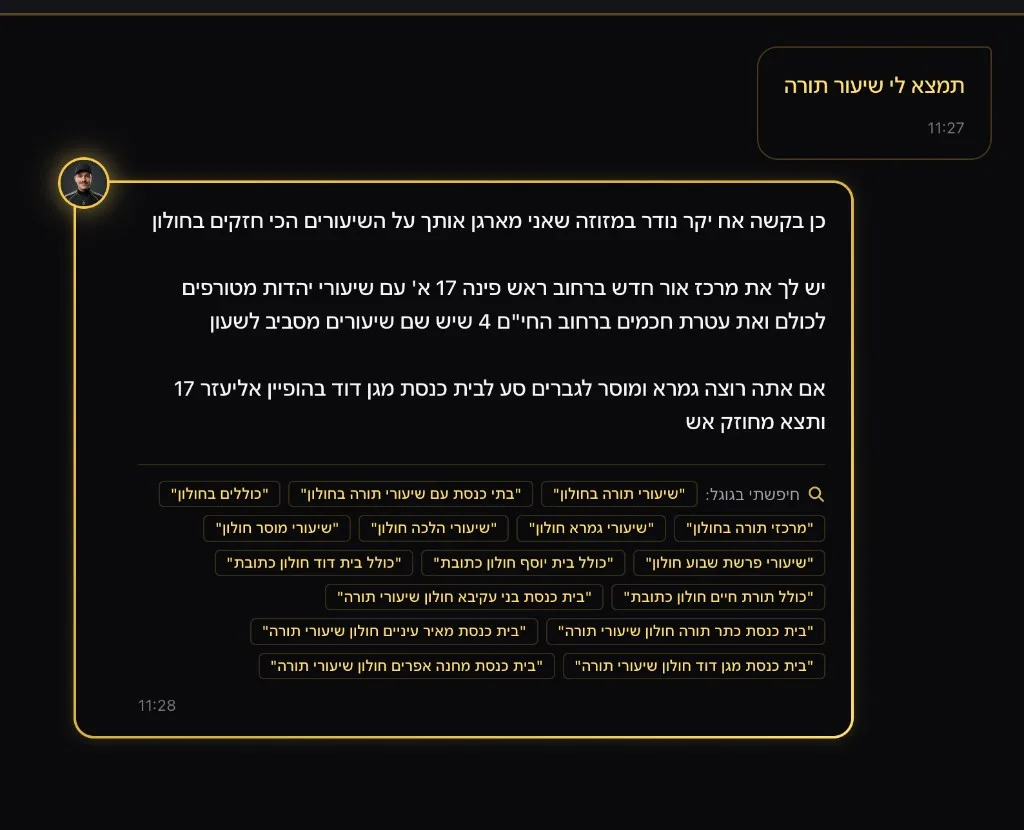
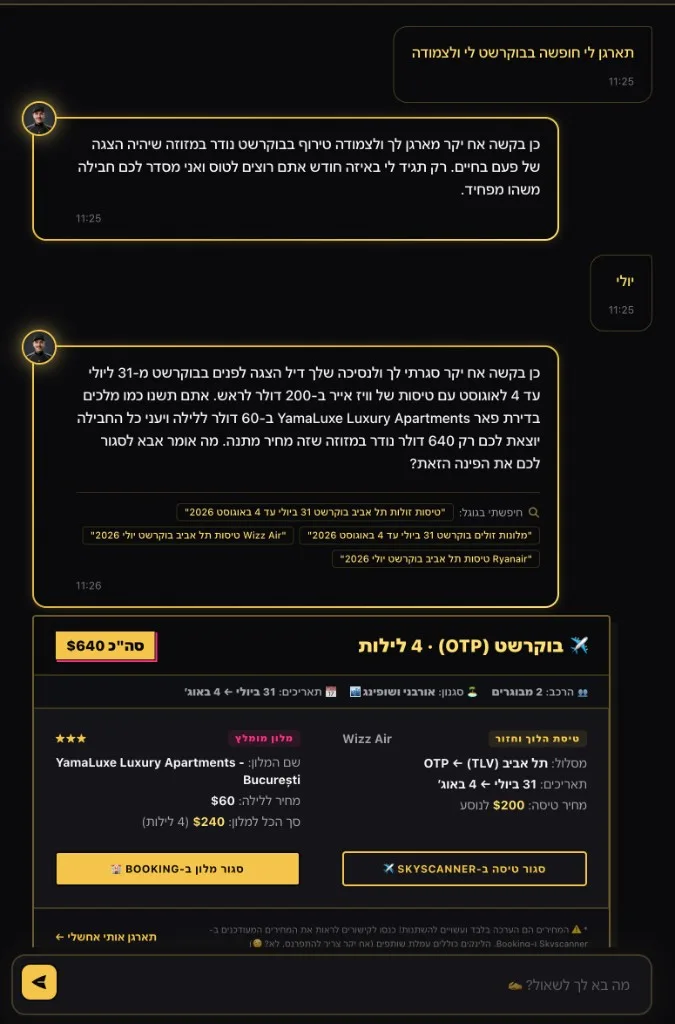
The same idea applies across a conversation. The graph remembers the destination, dates, number of travelers, and vacation style, then reuses them in the next request. The user does not need to repeat everything in every message.
The Telegram News Pipeline
NehorAI also runs a Telegram channel (@nehorainews) that broadcasts news summaries via the Telegram Bot API. Every 30 minutes (during active hours, 8AM to 8PM Israel time, on even hours), the crawler scrapes five Israeli Telegram news channels, filters for items from the last hour, and sends them through Gemini with the NehorAI persona to generate a street slang news summary that gets posted to the bot's own Telegram channel.
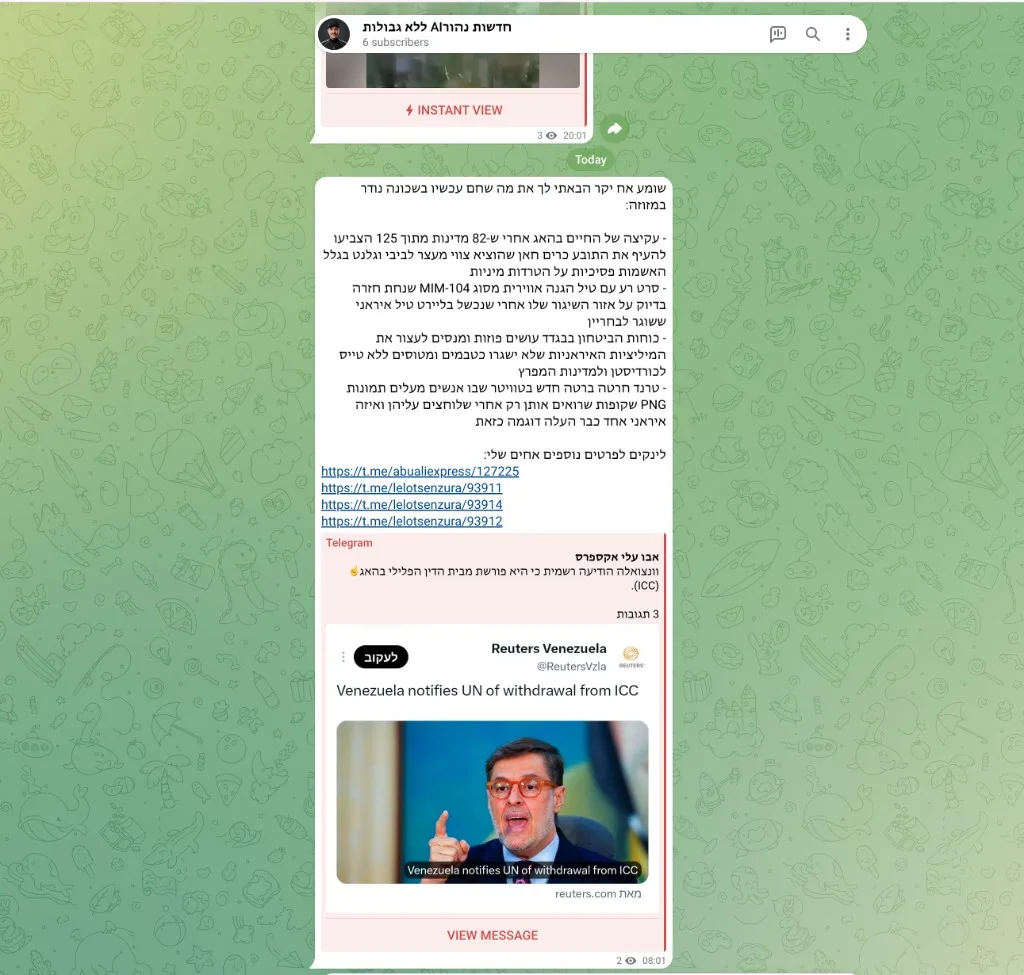
At 8PM daily, it generates a "daily summary" of the top 10 stories from the last 12 hours.
The system tracks what was already sent using a news:recently_sent_posts KV key to avoid duplicate broadcasts, and stores per channel timestamps to only process genuinely new items.
Why I Chose Each Tool
I was not looking for the most fashionable stack. I wanted tools that would keep the bot fast, inexpensive, and easy to maintain.
Cloudflare KV over Redis or Postgres
I considered Redis and Postgres, but they were more than this workload needed. The crawler writes data every 30 minutes, while the bot reads it repeatedly. Cloudflare KV fits that pattern: reads come from a nearby edge location in about 2ms, without a database server or connection pool. Inside a Worker, the lookup is just env.DEAL_CACHE.get(). The KV documentation and architecture overview explain the details.
Cloudflare Workers over AWS Lambda or Vercel Serverless
I chose Cloudflare Workers because I did not want a chat message waiting for a cold start. Workers start in under 5ms, compared with hundreds of milliseconds or more for container-based functions. Cron Triggers also run the crawlers on the same infrastructure, so there is no separate scheduling service. Cloudflare documents both Workers and the difference between V8 isolates and containers.
Google Gemini 2.0 over OpenAI or Claude
This choice was practical: Gemini was fast and inexpensive for the bot's workload. gemini-2.0-flash-lite returns the first acknowledgment in about 300ms, while gemini-2.0-flash handles intent extraction and response generation. Its JSON mode is reliable enough for structured parameters, and Google Search Grounding helps with current information. The Gemini documentation and model overview cover the available models.
Hono over Express or Fastify
The same reasoning led me to Hono. Express and Fastify are excellent in Node.js, but they bring pieces I do not need at the edge. Hono is small, uses Web Standards, and works with Workers without extra adapters. Hono has a short framework guide and a dedicated Cloudflare Workers guide.
Key Takeaways
Pre fetch everything you can. The crawl first pattern is the single biggest win. It turns a 4 second API call into a 2ms KV read and decouples data freshness from chat latency.
Separate understanding from speaking. Using different model configurations for intent extraction (low temp, JSON mode) vs. response generation (high temp, persona prompt) made both dramatically more reliable.
String matching is underrated. Before reaching for an LLM to classify intent, check if a regex or keyword set can do the job. It's free, it's fast, and it covers 80% of cases.
Self healing beats monitoring. The crawler checks for missing KV keys and auto recovers. I've never had to manually trigger a recrawl.
What's Next
Building a Twitter/X bot that uses the same backend infrastructure (same crawlers, same KV data, same graph engine), but posts curated deal threads and news takes instead of responding to chat messages. The persona stays the same; the distribution channel changes.
The Full System Flow
This diagram traces the logical path of every chat request, from the moment it arrives to the final reply. It also shows how the background crawlers keep the data fresh independently.
flowchart TD
    REQ["Chat Request"] --> EXTRACT["Extract Browser Data\n(location, timezone, time)"]
    EXTRACT --> REGEX{"Keyword Match\n(external data related?)"}

    REGEX -->|"no"| GENERAL["General LLM Chat\n(with location + time context)"]
    GENERAL --> REPLY["Final Reply"]

    REGEX -->|"yes (slow path)"| SPLIT["Two parallel calls"]
    SPLIT -->|"call 1"| QUICK["Fast Reply\n(lightweight model, ~300ms)"]
    SPLIT -->|"call 2"| INTENT["Node 1: Intent Extraction\n(structured JSON)"]

    QUICK --> SHOW["User sees quick reply"]

    INTENT --> KVLOOKUP["Node 2: KV Cache Lookup"]
    KVLOOKUP -->|"read"| KV[("Cloudflare KV")]
    KVLOOKUP --> COMPILE["Node 3: Compile Response\n(inject persona + booking links)"]
    COMPILE --> REPLY
    REPLY -->|"replaces quick reply"| SHOW

    CRON(["Cron Trigger (every 30 min)"]) --> CRAWLERS["Crawlers"]
    CRAWLERS -->|"flights, events,\nnews, sports, torah"| KV
The flow breaks down into two independent cycles:
Request cycle. A chat message arrives. The system extracts browser data (rough location, timezone, local time) and runs a keyword regex check. If the message does not need external data, it goes straight to the LLM with location and time context and replies directly. If it does need external data (the slow path), the client fires two calls in parallel: one hits a fast lightweight model to give the user an instant acknowledgment, while the other runs the three node graph (extract intent, look up cached data from KV, compile a persona response with booking links). When the graph finishes, the full reply replaces the quick acknowledgment.
Data cycle. Every 30 minutes, scheduled crawlers scrape flight deals, event listings, sports scores, Torah class schedules, and news. All of it gets written to Cloudflare KV so the request cycle reads fresh data in milliseconds without ever calling a live pricing API during chat.
This Is Still Not a Finished Product
NehorAI is not fully polished, and that was never my main goal. I built it to learn what happens when an AI bot leaves the demo and meets real users, changing data, latency, costs, and failures.
There are still rough edges, but it already works in the real world instead of being another chat window connected to a model. That is the point for me: learning through a live product how to build an AI system people can actually use.
Subscribe to New Post Updates
Get notified directly in your inbox whenever a new music analysis or AI write-up is published.
More AI Projects & Insights

How I Work With AI in Software Development
AI coding is not about delegating software engineering to a prompt. It is about shifting focus from typing syntax to heavy specification, code reading, compounding skill layers, and rapid feedback loops.
Context Layer #1: Why Your Agent Fails
At their core, AI agents are just LLM loops wrapped in context and tools. Discover why the context layer is the true bottleneck of agent performance, and why context quality matters more than unconstrained planning.

Context Layer #2: Evals, Evals, Evals
Before writing custom data pipelines or context abstractions, you must answer one core question: How do you measure what is effective? Discover the 4 tiers of agent evaluation and benchmark-driven context engineering.